Over the Wall

Reflections on the Adoption and Use of Obstacle Boards in Agile Practice

Life is full of obstacles. Be it school, work, home or any other feat we set our sights on, there’s bound to be a few blockers along the way. Let’s be honest, if every desire or achievement came easily, life would be rather dull and unfulfilling. While we can’t always get what we want, jumping a few hurdles builds us up better than having everything handed to us on a silver platter.

Software engineers regularly overcome hurdles in the building of new products

Software development is no different to life. Regardless of the process and technologies utilised, teams will encounter issues. My personal view is remediation of these blockers make building software to be one of the most challenging and fulfilling pursuits. There is nothing more satisfying that solving an issue that has been plaguing your progress. However, in order to achieve that dizzying high, we must first identify and remove the obstruction.

Recent challenges with development of a new product have required some experimentation in how we manage impediments. Our latest experiment is using an Obstacle Board to visualise and track problems. While I’ve found many useful resources describing what Obstacle Boards are, and how to create them in particular tools, people’s experiences of using them seem to be less forthcoming. This week I ponder the successes and challenges of our recent Obstacle Board adoption along with next steps in our journey.

Outside the Wall

While there are many resources that describe what an Obstacle Board is, a brief overview is definitely required. I have certainly found that almost everyone has some knowledge of Scrum and Kanban boards, but that same population are less familiar with Obstacle Boards.

Quite simply, it’s a twist on the usual story board that the majority of Scrum and Kanban teams use. Regardless of whether you use physical boards and post-its, or tooling such as Jira and Trello, an Obstacle Board provides visibility to the state of any impediments to your current work. As pictured below, blockers can still go through a simple workflow to address them, or even be integrated into your existing Kanban Board as discussed by Judicael Paquet.
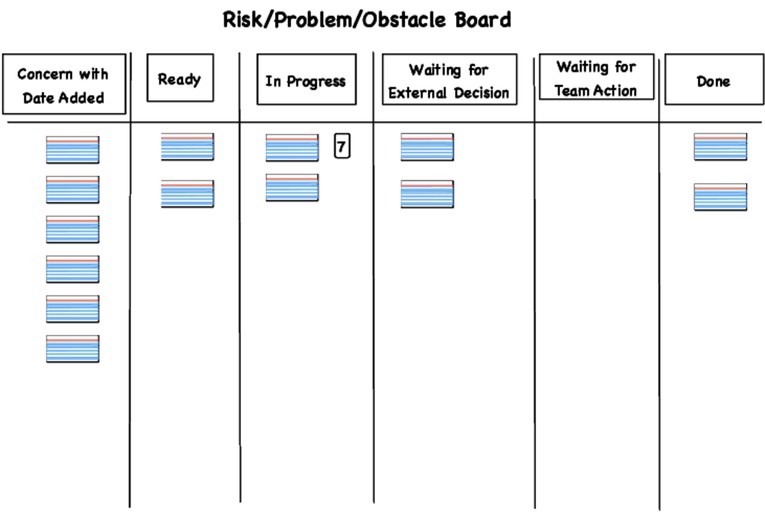
As you can see, Obstacle Boards visualise development hurdles In a very similar way to how we visualise work in Kanban

Before adding an Obstacle Board to our process, it was important to provide an education to both developers, business analysts and the product owner. Not only is this required to explain the concept, it can help to justify why it should be introduced, and facilitate discussion on if and how the team would like to use this technique. In particular, I have found the following resources useful not only in reinforcing my own understanding, but also in this education exercise.

Building a Wall

Now having done your homework, you should know the purpose of an Obstacle Board. The next question on everyone’s lips is normally what is an obstacle? This is an interesting idea in itself as engineers perceive a blocker to be an issue that means they are not able to make any progress on an item. Snags that slow them down are not considered to be impediments as they are still advancing to their goal. A common understanding of what constitutes a blocker also needs to be agreed when adopting Obstacle Boards.

All squad members need a common definition of a blocker to make a success of Obstacle Boards

Our key problem here was stories were not being completed in the sprint due to logic investigations. With the build out of the new product, comparisons against the existing legacy system found behavioural differences. These proved to be a significant challenge for the development team, who needed to identify the root cause of these differences. Initial tracking measures attempted by the business analysts included Excel spreadsheets and email threads.

The team encountered several issues with reacting to these notification mechanisms. Firstly, the Excel sheet revisions being sent out daily resulted in many duplicate items when the same issue was encountered. The development team struggled to identify key themes, which made raising of defects to fix difficult.

Furthermore, investigation progress was all but invisible as we could not identify when issues were being investigated, and by whom. For those discrepancies that were investigated, significant delays were experienced as all updates were chased via email. Engineers don’t monitor their email constantly to reply to update requests, and if they did I wouldn’t certainly expect a reduced productivity rate as they’ll spend less time engrossed in their favourite IDE. These issues come under the latter definition of blocker, making them more impediments to team progress. Something had to be done.

Climbing Up the Walls

Like any experiment, control parameters and metrics needed to be set to allow for us to measure the effectiveness of the Obstacle Board. Firstly, we needed to identify the issues that were going to capture on the board, along with those responsible for raising the items. It was agreed to focus solely on the data integrity issues rather than raise other development blockers that programmers face while coding. Effectiveness was to be measured by tracking the number of obstacles raised per week, and time taken to commence investigation. Our hypothesis was that both would go down as issues were remediated and the tools accuracy improved.

I’m not going to quote numbers, which may sound strange given the push for quantitative metrics. I’m happy to reporting that both measures have been experiencing a downward trend. In fact, over the last month no new logic snags have been reported, which is a huge achievement.

Initial experiences have shown the Obstacle Board to be a great success in the tracking and remediation of specific impediment types

From a more qualitative standpoint, the board has proven to be a success. Both the Product Owner and Business Analysts have commented that the state of any investigations is more transparent. Any blockers can be explicitly assigned to developers and then back to BAs or the PO if further work is required. The added bonus is that they can be easily converted into stories where development is required, or linked together in the event that pitfalls originate from the same root cause. Developers are also reaping the benefits as they are better able to manage these investigations with other tasks.

Off the Wall

These initial accomplishments are amazing. However we do have some challenges to face to improve and expand our usage. In the current squad, we’ve had to tweak our capacity to ensure we can balance blockers with committed stories. Velocity is starting to even out, but for future efforts we may need to revisit the balance depending on the restrictions raised.

Balancing velocity is one challenge that must be monitored when we expand Obstacle Board usage to other teams

Board overload is a concern raised by some other teams when expansion to other squads has been discussed. I’ve already seen some reluctance to adopt on the basis that we are introducing too many boards. Many managers profess to the desire to have one board to rule them all. Coveting a single precious board has been far too limiting in my experience. Different audiences want a different view of state, be it precise development steps or a more high level, is it ready to deploy yet. Therefore, it is limiting to dismiss using an obstacle board purely for this reason.

Future plans are focused on expanding out Obstacle Board usage to other squads. A similar use case in other squad has already lead to requests from another Business Analyst group to suggest using the board in another space. However, blanket enforcement across all squads should not be the goal. Mandating tools and techniques removes the flexibility and team empowerment that Agile adoption is meant to provide us. Use Obstacle Boards when they can provide a benefit. Do not adopt them as the one ring to rule all issues.

Thanks so much for reading about our Obstacle Board journey!

In Front of Me

Reflections on UI Code Review Rules

The sun rises in the east. Two parallel lines will never intersect. A true idea must agree with that of which it is the idea. From real-life to mathematics to philosophy, life is full of axioms. Despite their established truth, it takes us time to learn these maxims and become comfortable that they are indeed true.


Please Stay on the Path Sign

Life is filled with rules to follow, including in writing and reviewing of code


Developers build up knowledge of rules and best practices through their experiences writing code. Part of this knowledge is transferred between developers through code reviews, and use of coding patterns. Exposure to different parts of the system will impact the patterns and rules that we learn. When the experience is weighted more towards backend development, as is the case for us, it becomes harder to disseminate UI standards across the group.


Last week office discussion has turned to UI code review standards. With our aforementioned skills gap, I’ve had colleagues asking what rules I employ in reviewing of our Angular code. These requests have me pondering if code review best practices really that different in Web UI versus traditional back end services. This week I outline some of the my own personal UI code review regimen, and analyse the overlap between UI and middle tier practices.


That’s My Style


Common style guides are a great tool for enforcing a consistent code appearance. While developers have their own preferences on attributes such as brace placement and indentation, enforcing a common standard ensures for better code readability. Many organisations, or even individual teams may have their own for key languages within their technology stack. Regardless, there are plenty of external guides that can be leveraged.


Woman With Style

Despite all engineers having their own style preferences, teams should adopt a common style and stick to it


Technology specific ones, such as the Angular Style Guide are preferred over internal standards to align with industry best practices. We have our own Java style guide that integrates with developer IDEs. But for UI, we conform to the Angular Style Guide across the team since we use the Angular framework for all our UI modules. We also ensure our style is enforced using linters such as ESLint for JavaScript and Typescript. Note that it is now standard practice to use ESLint for TypeScript projects as well since TSLint no longer has active support. In addition to providing the aforementioned readability benefits, it also reduces the codebase learning overhead for developers. This applies to those both new to UI within your company, and those new to the organisation altogether.


Complex Person


File and folder structure standards are another important style guide attribute to note. These are often enforced by frameworks. In our case, these are established by the Angular and Gradle structures mandated on the client and server respectively.


For the UI we have all code for a given component housed in a single folder, and common project components listed under a shared folder as outlined in the official Angular Style Guide referenced previously. I also recommend a standard of housing templates in a separate file over inline to ensure consistent usage across the platform. Otherwise programmers tend to use a mixture of inline and separate file based on component size.


Bridge

Modules should use a simple, agreed structure, with a folder for shared components


Once projects start to grow in size, the nested structure outlined by Tom Cowley becomes more scalable. Where components are required across modules, they should live in a central module that can be managed using NPM. The balance is difficult to strike, but it’s important to identify copy patterns across your own modules to decide when to split a component into a shared module.


Different Languages


Developers should also make use of language construct best practices in their code. These attributes are easy to enforce via code reviews. We are well established in server side practice. Through our use of Java developers are comfortable on when to use streams and collectors versus loops.


Code

Be mindful of using standard programming language patterns


With our heavy use of Typescript, there are some key language good practices that we should be on the lookout for, and should be including in our linter configuration. My biggest bugbear is the use of the any type as general practice. Developers commonly use any in circumstances where they can use a defined type. It is often made use mistakenly in core utilities, where generics would be used in Java. Given Typescript also supports generics, as well as the unknown type, any is not always a valid alternative.


Legitimate cases do occur, especially where you are using a third party library interface that is making use of any. Define explicit interfaces and use types to enforce type safety. Make use of Typescript constructs such as union and intersection types where you want to support multiple types. Otherwise, what’s the point of using Typescript over JavaScript?


Coming Clean


It is a common misconception that best practice patterns are limited to a particular technology or programming language. This notion limits software engineers in their ability to grow as front-to-back developers.


Cleaning in Progress Signs

Clean code practices can be applied to any programming language, not just Java


The key text I refer developers to for code standards is Clean Code by Robert C. Martin. I commonly hear from programmers that it is only considered relevant to Java since all the examples are written in Java. This could not be further from the truth. As part of my own reviews, I am regularly on the lookout for many of the practices Uncle Bob preaches, especially the following:


  1. Descriptive functional and variable names that gives detail on the constructs purpose. This includes being on the lookout for non-standard abbreviations that may not be clear to all.
  2. Levels of nesting. Initially reviewing the indentation of a method can give a strong indication on code complexity. Nesting several levels deep should be refactored to promote readability.
  3. Class and function length. Although number of lines of code is not a prescriptive measure of productivity, large classes and methods should be broken down to improve readability.
  4. Levels of code duplication. While in UI projects there is an element of duplication in terms of annotation and form component usage. Although it could be argued that using CLI utilities such as Angular CLI does eliminate most of these requirements. Be wary of significant copy pasting efforts. If you are regularly using the same settings on components such as date pickers, or cell for matters, consider extracting them to a shared utility that can be reused across the project, or even modules.


There are extensions that are UI specific. A key example for me is the use of variable names in style sheets. Through our use of Sass, we can utilise many CSS extensions such as hierarchy and variables. Use of variables for common style attributes such as colour and padding size are another quality that I look for in reviews. These searches are inspired by the descriptive variable names above, and definitely makes style sheets more readable.


Close to the Front


The final, crucial element of any UI review is to evaluate the appearance and workflow of any functionality that is built. While wireframes and prototypes should be produced in advance to determine the feature direction, that does not negate the need to assess the appearance.


Presentation of any UI component should always conform to consistent practice. As the platform grows, it’s important to replicate style and workflow across the system. UX designers are pivotal in establishing common design. However, in the event that a designer is not present in your team, the responsibility relies on all developers to conform to a standard.


Woman Looking in Mirror

Code style is important, but in UI the appearance and workflow of the feature must also be reviewed


Centralised components and style sheets allow you to build up reusable facilities to enforce common appearance. It is important to review style as part of any peer review. The simplest way I’ve found is to attach a snapshot to the pull request to showcase the new features appear.


While a great initial step, screenshots are limited in their capability to allow inspection of workflow, cross browser compatibility and general style. A better approach would be to have an instance spin up as part of the pre-commit build for every request. These ephemeral instances allow for developers to live test and experiment with the features to provide more targeted feedback. This is currently a dream for us, but very much an achievable one with some time investment.


Front Row


Regardless of technology, peer reviews are a vital skill for maintaining quality standards and building developer experience. I’ve outlined many of the resources and attributes I use in reviewing of others UI code. The importance is to adopt a common standard to which the team can commit.


Newspapers

Growing a set of UI review best practices takes time, and performing of reviews from many other reviewers


These maxims will form but the beginning of the total rule set. Our axioms will continue to grow as we receive feedback on our code from others. That includes others reviewing my own code.


There is more to reviews that hard rules too. My last, and most important advice, is to be wary of your language in comments, particularly if using commenting features in tools such as GitHub and Bitbucket. In more recent times we’ve had discussions about being clear what items will block merging and which items are optional opinions that can be discussed or actioned later. Unfortunately we have even had discussions about which comments are hurtful and derogatory too (yes really). Feedback builds better engineers. But ensure you communicate them with humanity and empathy.


Thanks so much for reading! Do let me know of any review criteria and resources that you also use for reviewing code.

Come Together

Experiences of Software Development Squad Makeup

No man is an island. It takes a village. Quotes are littered through our culture in support of working together. Be it in our personal or professional lives, we achieve more when we collaborate with others.


Much has been said on the importance of diverse teams. This includes diversification of personality and thought. Regarding role diversification, the traditional waterfall software development model encourages segregation of different functions that contribute to the development and maintenance of systems. It has always seemed like a strange model to me, that breeds division.


Island

No longer can developers build software in isolation and ship to customers


Our Agile journey has taken a further step forward in the combining of some key functions within the Agile squads. As with many experiments, this has produced mixed results. This week I reflect on our progress of integrating various roles into one particular squads, and set my sights on future inclusive goals.


Let’s Build a Home


Developers are the cornerstone of any Agile software development team. Without their coding skills, the products we built to support our clients would be but a distant dream. It is for that reason that Software Engineers and Scrum Masters have always been part of our squads.


Having them work as an isolated team has reaped rewards. In our early Agile adoption days, all teams were delivering working software at a constant pace. Coding and testing standards are on the rise. Morale was on the up as teams achieved a steady release rate.


Developers Collaborating

Developers working together in small increments did initially improve software delivery rates


This isolated model does introduce strategic challenges. The team were building strong client relationships and working across the divide to product features of value. Yet, these features became disjointed due to a lack of product ownership. Without direction from a single senior stakeholder, programmer only troops will struggle to understand the product strategy. This manifested itself for us in the delivery of features that didn’t quite hit the mark. These became the justification to push for our first addition to the squad.


Go Your Own Way


These experiences highlighted the need for an integrated Product Owner. Someone able to own the product direction. Many Agile frameworks, including Scrum, mandate that the Product Owner is always part of the squad. Yet in many organisations it proves to be difficult to sell the role. Despite practicing Scrum and Kanban for almost three years, it has only been this year that we have achieved the impossible dream of a truly dedicated Product Owner that gives true product direction.


Until this role is recognised as a legitimate and rewarding role, many other teams will fight the same battles. While awaiting someone exhibiting the desired attributes of a Product Owner, we made use of proxies. Said proxies are not nearly as effective, especially if using a Business Analyst or Product Owner in their place. I have encountered exceptions. However, the majority fail to meet expectations as they don;’t have a vested interest in the product. Instead or driving to a strategic direction, they conform to the age old man in the middle that can obfuscate the vision through indirection.


Key in Hand

Dedicated Product Owners have the keys to drive value for their own benefit, which proxies do not


Level of engagement does indeed vary. Our greater commitment successes have had the Product Owner being present in the majority of ceremonies. Extending invites to standups and backlog reviews have proven to give better direction to developers. Yet if the reluctance is to be obliterated, it is more important to identify Product Owners available for questions if attendance to all ceremonies is not achievable.


Misery Business


Business Analysts have been a recent addition to a couple of our squads. This might sound odd as there is great differing opinions as to the value of BAs in Agile practice. Historically they have worked in isolation as either an information wall. Or as a compromising Product Owner Proxy in some of our later trials. This delegate approach proved fruitless for one crucial reason. They don’t necessarily care about the features being built. This is not intended to criticise their work. It is simply acknowledging how challenging it is to give accurate indications of priority, or answer process related questions when you have no vested interest in using the product itself.


The days of BAs writing large requirements documents are, thankfully, for the most part gone. Instead they support the Product Owner by assisting in the logging of stories and generation of behavioural acceptance criteria. That frees up our busy Product Owner to juggle prioritisation, product strategy and their day job.


Endless Book Trail

We’ve found that BAs can change their focus from writing endless requirements documents to writing user stories and acceptance criteria at the direction of the PO


This engagement is proving more effective than our prior proxy model. Teams still engaging in segregation are finding that requirements clarifications are less forthcoming. Furthermore, signoff of deliverables is far more elusive as the team quite often build features that don’t quite meet the intended requirement. This breeds the common misconception that Product Owners, or indeed other stakeholders, cannot reject features they consider to be unhelpful or unsatisfactory.


No Control


One group that proves to be elusive to integration is our Quality Assurance arm. While some squads have better success integrating dedicated testers, our model of automated testers and user testing means this is not required. QA for us is more around supporting of the products we build, and integration of tooling for diagnostics.


This lack of integration poses several challenges. The main is that developers have a distinct lack of empathy for those supporting applications. Documented details of the platform infrastructure are not provided. Design of the system support mechanisms such as alerting and logging are an afterthought. The optimistic nature of developers means we need expertise in those used to failure in building our systems.


River Dam

If QA colleagues are constantly working to stop a flood on legacy applications, they will struggle to support developers in the build out of scalable, supportable applications


The message that everyone is responsible for production support must be reinforced. Integrating a dedicated support agent looks to be a valid approach. Pressures on their time is the main blocker around integration. Especially when we balance support of our legacy systems that require more intervention. Global support by a co-located squad would also be difficult for one agent. The first step would be for assigning of an individual to to be available to guide developers in building supportable applications.


A Change is Gonna Come


Reflecting on our journey this far, the integrations achieved are reaping great benefits. Developers now receive feedback and clarifications on features more rapidly than before. Clients better understand the value they receive, and are empowered to prioritise the features they need, as well as understanding the reason for any hygiene the team performs.


Fast Cards

Our successes are simply the start of our journey to integrate all required agents into all of our squads


That’s not to say that the adventure is over. Our QA engagement is another item of focus. The successes clearly can be scaled and replicated across our other sprint teams. That way we can ensure all groups come together.

Thanks for reading!

Same Size Feet

Identifying the Need for Story Splitting

We all remember our favourite childhood fairytales. Despite being significantly short, they all follow a similar format. Each story arriving at the perfect ending following the protagonist overcoming strife.

Every time I think about story splitting, I am immediately reminded of Goldielocks and the Three Bears. A young girl’s quest to find the perfect tasting porridge and unequaled chair. It’s easy to draw parallels between relative story sizing and this well-known fable.

Much like the chair in Goldielocks and the Three Bears, User Story size must also be just right

Regardless of degree of Agile maturity, the size of the stories our squads are working on and their ability to split is an ongoing issue. Different teams have different challenges. Some stories are too big. Others are too small. This week I look at how to identify issues with story sizing, and showcase possible mechanisms to help identify when to break them down to a size that is just right.

Shapes and Sizes

The primary manifestation of poor splitting is a large variation in the size of stories on the backlog. Most squads in our area have significant stories in their backlog, intermingled with small single point defects. One team is better than most at creating smaller stories. Even then, their range can massively fluctuate.

Having large variance in story sizing makes it diffcult to track velocity and compare stories for future estimation

tions across these teams. We cannot compare their velocity. Despite management objections, we push to prevent comparison across teams. The relative comparison of story points should be across a single squad. It is the responsibility of each individual Scrum team to regulate story size, and split as they see fit.

It’s Only Rock and Roll

A secondary symptom we have encountered is regular rollover. Large infrastructure upgrades on a legacy system have been a key example in our space. Having a single story was not viable for several reasons. Legacy systems are often poorly documented, making identification of dependencies difficult. Larger systems also require significant work to upgrade as well.

There has been significant debate on the maximum size. Concerns are that splitting the story may mean the value is lost. Regardless, the majority agree that a story must be small enough to achieve in a single sprint. This item was not, and therefore needed to be broken down.

Stories regularly rolling over across sprints suggests it is not well understood, and potentially that it is a larger story that must be split

Our initial approach to break the story by each environment still resulted in rollover. As the work progressed, more undocumented components required upgrade. More legacy technologies required remediation. Hindsight teaches us that had we been able to isolate each component for upgrade, along with the at risk processes, each story could have been smaller and manageable. Their value would also have been easier to communicate to clients, and the resulting progress would have been more transparent.

Blue Condition

Another warning sign that I’ve recently encountered is the length of the acceptance criteria associated with a given story. As part of our increased collaboration with BAs and our engaged PO, a larger amount of detail will accompany each story.

This degree of collaboration has proven to be a double edged sword. Having greater engagement means we are getting more clarifications of user needs and product strategy. We obtain behavioural scenarios as acceptance criteria. However we still receive large sets of bullet points as additional acceptance criteria. While developers strive to meet the full criteria, in the ever changing criteria items are often missed, leading to defects being raised later.

Developers are regularly bamboozled and trapped by the sheer amount of acceptance criteria that underpins our stories

This has got me thinking of the old tactile approach of using index cards for our stories. Despite the numerous benefits, a side-effect of using automated tools such as Jira and Trello is that we cannot regulate the amount of detail using the size of the index card. Be mindful of the amount of criteria specified for any given story. Consider using our current rule of thumb, where if the criteria won’t fit on a single side of an index card, your story needs to be split.

Price Tag

Where we struggle to split using the above indicators, our ability to break down and estimate the story is our final mechanism to verify a story is not too big. As simple as it sounds, if we cannot comprehend how to break it down, or the story decomposes into a large number of sub tasks, it’s time to split the story down. Our prior rollover example certainly was partially caused by being unable to estimate the original story.

If we cannot understand or estimate a story, it’s most likely too big for the team and must be split

The above symptoms are classic manifestations of too big stories. The next question on our lips is what techniques can we use to break stories down. My research has identified several approaches to help without efforts. Initial thoughts are that the generic words and acceptance criteria approaches are particularly useful. Only time, and a future post, will tell how effective these techniques prove to be.

Thanks for reading!

The Show

Why Reviews Are More Than Just Demos

Theatre showcases are a opportunity for drama students to present a piece demonstrating their developing talents. Treading the boards to show their progress. The parallels to sprint reviews are many. Think of the squad showcasing their progress on building software to an audience of eager critics.

The sprint review is intended to showcase the accomplishments of a sprint. Arguably it should be used to highlight failures and learning outcomes as well. These days we are fortunate to have built increased engagement with our clients. Specifically, we finally have a dedicated and passionate Product Owner who has built strong interest in the product in-progress. With that we have seen that the same old sprint demo format needs some polishing.

This week the spotlight has been on our sprint review ceremonies, and how to make them more effective in eliciting feedback

Recently our team has been reflecting on our sprint review processes. More specifically, I’ve been asking myself one simple question. Can a sprint review be more than a demo? This week I look back over our review roaming, and contemplate the lessons I’ve learned on this turbulent trip.

Start the Show

The early days of our agile adoption were a buzz of activity as we adjusted to this new way of working. Enthusiasm among developers and users alike was infectious. Every two weeks we would have strong attendance to showcase multiple deliverables across numerous products. This new level of engagement did wonders for engineer morale, as their contributions were regularly recognised.

Following any dizzying high, there follows a devastating low. Over time attendance began to dwindle. Frequency of demo sessions began to drop. Feedback on new features was not forthcoming. Developers were left questioning the value of the features they built. It was definitely quite a fall.

See You at the Show

To rebuild the review revelry, we must undertake a postmortem to identify the cause of death. Part of the problem boils down to squad behaviour. One bad habit was the team cancelling reviews when they didn’t have a complete feature to showcase. Perhaps the competitive culture in which we strive to succeed encourages us to hide failures offstage. Encourage a spotlight to shine on both successes and failures to build up feelings of accountability.

Lack of preparation for demos is another cause. Developers quite often prepare a non-production environment to showcase, or mock up messages to present ticking data. Yet, they don’t memorise their script, or plan how to best present the feature. Presenters must strike the balance between winging it and over-preparing to ensure they can cover all aspects of what was achieved, as well as field the unexpected questions.

The entire team must prepare for a demo to ensure we are singing off the same song sheet

Stakeholders also have a part to play in the demo demise. Not all clients want to see all features. In our case, key users were only interested in enhancements to the products they used to conduct their daily business. Supervisors however were curious about all products generally. The lesson here is to consider your audience carefully. Distinguish between mandatory and optional audiences in any invites.

The final cause for disengagement could be a lack of context. With rewrites this can be more prominent, but I have seen the same effect on new products. A single small feature does demonstrate the incremental value we are delivering. However, clients often need to see the road we have travelled, and what lies ahead to validate we are heading in the right direction.

Don’t Stop the Show

Such issues have plagued our reviews over the past year. These are indeed fixable with preparation and mixing up the format, as we shall see in the final act. What requires more work is the changing of engineering attitudes. Technologists will always attempt to justify why their work should not be shown. The wording here is purposeful as we must consider software and infrastructure based projects in this argument.

I often hear that although work X was completed, that it is not possible to demo. Reasons for this belief are varied. In the software world, any enhancement without a UI is considered impossible to showcase. In infrastructure circles, the effort to build a functioning environment often outweigh the benefit of demonstrating the benefit.

Feedback should be gathered for all enhancements, even if they are considered to have a supporting role

These reasons highlight that the time is right to get creative, and choose the appropriate medium to showcase our work. It is true that presenting working software is a very effective mechanism. But this format is not always the right call. Perhaps it’s automated testing, message passing, diagrams. Something that shows why what was built is important and useful. If you enforce this way of thinking, the sole argument for not showing off an enhancement is then a question of business value.

The Show Must Go On

With the aforementioned concerns alleviated, technologists can no longer justify not showcasing what they’ve built. The review feedback loop is vital, regardless of the Agile paradigm practised. Rather than calling time, it should be taken as an opportunity to consider a different format. Application of experimentation and continuous improvement applies to the entire process, including reviews.

The latest and greatest feature doesn’t have to be the only item showcased. Recall one of our key issues with clients questioning where this new feature fits in their process. When clients continually ask what’s coming next, they are not providing the team with feedback on the product.

Stakeholders are always looking forward to see what will happen next

To elicit constructive commentary, we are starting to use additional artefacts. The product roadmap is the perfect tool for discussing the route we are travelling, and providing context on where we are, as well as our current direction. By-products of any analysis or design thinking stages such as wireframes and flow diagrams can be useful active mediums in conveying the value produced over the current cycle. With many methods available for reviews, it is vital for us to plan in advance with the product owner to ensure an effective feedback process.

Thanks for reading!

Slow It Down

Causes and Symptoms of Too Rapid Software Development

In the digital age, the demand for software, and therefore software engineers, only increases. Long gone are the days where significant delays in delivery are accepted. To meet existing regulatory and competitive demands, developers must rapidly produce more software. Yet until the cavalry arrives, the same technologist population will be pressured to meet the need.

Is it possible to be building software too fast?

Rapidly increasing velocity to address these requirements can have dire consequences on the quality of our products. With the going getting tough, many of these consequences are coming to light. Lately I’ve asking myself, are we delivering software too quickly? From too slow to too quick, this week I reflect on the causes and symptoms of quick-fire development, the pressures it instils, and propose solutions to address the resulting predicament.

Under Pressure

To examine the effects of the development dash, we first need to understand the causes. I’ve identified three primary reasons for our recent software build scramble.

There is more to life than simply increasing its speed.
― Mahatma Gandhi

The cliche response of pressure is definitely one. Yet the weight comes from several different places. Management pressure is the obvious one. Aggressive delivery deadlines, originating from executives or business leaders, produces a team of Atlas’s desperately holding the weight of the world on their shoulders. Programmers may feel a compelling personal obligation to deliver in these circumstances. Nurturing ownership within the squad does foster quality in the craft. But it can also lead to them meeting delivery pressures until they burn out.

Thirst for knowledge may be another contributing factor. With many established patterns and technologies in regular use, building out new features can become repetitive. When new technologies infiltrate the stack, everyone wants a shot at playing with the shiny new toy. They may therefore rush through the known tasks, dreaming of a shot at the unknown. While drive to learn and improve should be commended, sacrificing quality to get there should not be encouraged.

Technologists may rush through working with the same old technologies to find the new technical toys to play with

Insufficient planning and estimating is the final weighty nail I’ve seem hammered into the proverbial pressure coffin. Although it can be partially down to time pressures, that’s not always the case. Story breakdown and estimation are a key part of Agile practice. Yet the feeling among our squad is our breakdown requires rework. Currently sufficient detail is not put into the breaking down of stories. Additionally, stories and tasks themselves are too large and require splitting. This leads to confusion in development as developers struggle with multiple blockers, unplanned work and coordination of tasks.

Warning Sign

Identifying the causes is one thing. Detecting the manifesting issues are another. How does these factors affect the team and their deliverables? You may be fortunate that programmers will proactively raise concerns. We are lucky that our recent retrospectives have resulted in many frank discussions on identified issues. Developers have also proposed a ton of new ideas on how to address them. Regardless, squads should be on the lookout for some of these symptoms.

From a Scrum standpoint, you may see regular rollover of stories into the next sprint. Uncompleted stories are a classic indication of over-commitment in a cycle. This is expected when the team start practising Scrum. If it continues beyond a couple of sprints, or re-surges in an established team, this should be considered a sign of over-commitment and potentially poor planning.

Lookout for the warning signs of building software to fast before the seas become choppy

Mumblings around compromising behaviour on quality and definition of done is another. It may come from the team, or from senior management. That initial discussion of dropping test coverage, delaying refactoring or deprioritising technical debt should be considered with extreme caution. Standing your ground on standards is far from a sign of stubbornness. Reducing focus on these thresholds sets a dangerous president that quality and stability is less important than feature delivery. Quite often this exacerbates the pressure by contributing to our final warning bell.

The most prominent issue to beware of is an increase in defect rate. Of late, I have seen these manifest in two scenarios. If we are fortunate, it will be a behavioural defect identified in a sprint review, or in subsequent user testing. If we are unlucky, and we have been, they shall present as production defects that require urgent remediation. These lead to a self fulfilling cycle of incomplete sprints, as the effort taken to address these problems will detract from development of the features to which you have committed.

Fix Me Now

As a leader, the natural, human reaction may be to get angry and push more for teams to solve problems as they appear. I’ll raise my hand and admit to making this mistake recently. Yet, playing the blame game and scolding developers like children is the wrong call. It shows a lack of leadership and control. Furthermore, it suggests taking failures as an individual loss rather than a collective responsibility. I’ve found alternative tactics to be far more effective.

As a first, be comfortable slowing down the pace of development. Discuss the current situation honestly with the Product Owner. Any defects or technical debt that have been identified to date should be documented in the backlog and prioritised with other work. Having all items present in the backlog gives full transparency to the Product Owner.

Be transparent with all defects and technical debt on the backlog, before it tears the team and clients apart

Speaking of the Product Owner, evaluate if developers are obtaining clarifications with the Product Owner often enough. For us, it has become apparent that we should be showing smaller progress points throughout the sprint to garner feedback. By showcasing small breakthroughs every few days, engineers are building a stronger relationship with our PO, and obtaining clarifications far earlier in the sprint.

On the quality argument, consider revisiting your definition of done. If individuals are discussing dropping quality thresholds, they may not be aware of the agreement. Otherwise, programmers may not feel they have committed to this software development contract. Be mindful that you shouldn’t compromise on quality and coverage metrics, but instead ratify the existing values. Also evaluate if there are items you are regularly not producing, and have frank discussions to ascertain if they are required.

Last, but by no means least, reevaluate your estimation technique. For us it has become clear that more effort and care needs to be taken on story breakdown and estimation. Think not just about task breakdown, but also story size. Perhaps you need to slice stories further using some of these techniques. It could be you need to redefine your relative sizes by re-estimating problematic stories. Or it may be as simple as committing to less points per sprint. Addressing these issues is by no means a sign of defeat. But an indication in the strength to provide true client value in a reasonable pace.

Thanks for reading!

Beyond the Limit

Pondering Test Coverage Limits and Thresholds

1729, 1089, 42, 3.14159… History, pop culture and mathematics are littered with magical numbers. The fame of each sequence of digits is established in different ways. People will remember those constants they come to use regularly over time in equations. Or those that dictate a formal limit that they must follow.


Numbers

What is the right number for test coverage percentage?


All good musings start with a question. What is the right percentage test coverage to enforce? The posing of this quandary by another on social media has got me thinking about test coverage again. What is the right number? Is there a right number at all? This week I revisit test coverage limits, focusing on what the limit should be, and mechanisms to enforce said number.


Test for Echo


As expected, the social media responses to the aforementioned question varied. Typical answers vary between 80 and 100%. My own opinion is that it should be at least 90%. Searching the expanse of the Internet doesn’t give you a concrete answer either, with similar ranges being discussed. Differing opinions on the effectiveness of 100% coverage are also easy to find.


Inside Lottery Machine

Some engineers still see writing tests as a bonus ball moment, rather than a mandated part of feature development


Perceptions differ vastly across my workplace as well. I would love to say responses are similar to the above. In certain circles they are thankfully within that range. However, there are still some that see tests are a bonus in the development of new features. That logic is so simple to understand that writing tests is pointless. This lack of craftsmanship allows you to identify those developers unable to own the features they develop like a flashing green diamond above their SIM.


Test Pilot Blues


Irrespective of an engineers dedication to the craft, the right number is one that is collectively agreed. Squads should be encouraged to aim high, rather than try to scrape the barrel for the lowest achievable threshold. Utilising lead engineers will help establish a high bar. The sole way to establish N% coverage as dogma is to have the team define N for themselves, and document it as the definition of done.


Strong lead developers will also be mindful that the right number depends on the current state of the project. Legacy codebases such as some that we own have low test coverage due to a previous lack of dedication to the automated testing cause.


Child in Chainmail

Legacy applications with historically poor coverage can cause developers to aim low in establishing their coverage metrics


Regardless of past sins, new components should not fall foul to the same poor practices. The team should agree a high threshold for all new components together. That should be as high as you can.


Put to the Test


Once test coverage threshold consensus has been achieved, it is vital to enforce the threshold. Coverage regression can be caused by several factors, which have been discussed previously. Of late, differing craftsmanship has been a lesser cause thanks to threshold quality gates, and enforcing of strong coverage practices through regular pull requests.


Deadlines have been the greatest single contributor of coverage dips in development of recent features. Even the most diligent of programmers will cut corners when it gets hot in the kitchen. This may be driven by a lack of dedication to the practice of TDD. Tests are still seen as an exercise to be undertaken once something works. This week I’ve seen an engineer writing tests for a feature developed last sprint, raising concerns that their inexperience meant it took considerably longer. This mindset drastically needs to change to ensure testing thresholds are adhered to and instilled among junior developers.


Timer on Laptop Screen

As we inch increasingly closer to deadlines, the first thing developers drop is writing automated tests


Going back to our legacy components, we need to be mindful of coverage dips when striving to improve our adoption. Gradually increasing thresholds is one way, but still mean drops in coverage without regular discipline. It also means once we overachieve, that engineers can drop the coverage to the bare threshold when the going gets tough. The use of delta gates should be considered to prevent coverage falls.


The Test of Time


This journey of discovery has helped me realise that there is no single solution to the coverage equation. Teams should strive to enforce a high standard that they can work towards, rather than imposing a minimum standard that has already been achieved.


Hands in Middle

Teams must agree on test coverage metrics together to build trust and consensus


Collective agreement on what the percentage coverage should be is important. I cannot impose my own 90% preference on the entire team. How can they possibly buy into a number that they don’t consider magical. Factors such as the current state can be a starting point. Legacy codebases will require use of delta gates to ensure an upward trend to your desired result. It’s by no means the end of the journey. Pick your percentage wisely.


Thanks for reading!

My Jekyll Doesn’t Hide

Client Visibility of Technical Debt Over Feature Stories

We all know that old idiom about skeletons in the closet. And the other advising us not to air our dirty laundry in public. Secrets in life are constructs that we prefer to keep hidden to prevent public shaming.

Many monsters lurk in our legacy code due to a lack of discipline in addressing technical debt

Secrets are also common to our technology platforms. Technical debt is lurking in every corner of our legacy systems. When not addressed in a timely fashion, these items become more costly to remedy. Without discipline, our newer platforms can suffer the same fate.

Hiding certain misgivings may be human nature. However, lack of transparency with clients in the accrual and remediation of technical debt is a common pitfall in software development practice. This week I reflect on the lack of transparency of technical debt with feature stories, and the need for product teams to engage with clients in prioritisation of all items together.

Hide Away Blues

My understanding of why technical hygiene tasks may be better off hidden doesn’t just stem from empathy. Our current setup purposefully hides it. A separate backlog of hygiene items is maintained and shared among multiple squads. While this approach has lead to a reduction of known debt over the years, we’ve also been presented with mixed results.

If technical debt is not repaid promptly, the cost of implementation increases exponentially

Small items are tackled easily with this approach, without severely impacting functional achievements. The value of regularly addressing smaller hygiene items should not be underestimated. This can introduce ownership issues for small items such as minor library upgrades. Those can be handled along with regular development if collective ownership is instilled.

Yet the challenge remains on the handling of larger remediations. These tend to undergo the pass the parcel treatment. No matter how many developers make progress on the item, the final feature takes significant time to complete.

Somethin’ to Hide

Legacy systems introduce significant challenges to hygiene transparency. The aforementioned sizeable items exist purely for lack of effort while they were easier to manage. In our case, we’re now having to pay the accrued interest. Our newer components don’t suffer from these trials.

Hiding hygiene items in the closest projects a false impression on system reliability

Yet our hidden hygiene history paints a picture that these systems are reliable, supportable and maintainable. In reality, these systems are rarely changed. Therefore older library dependencies are still utilised. Changes are as a result painful to implement as an upgrade of several versions requires more extensive testing, and manual at that due to lack of automated tests.

Motivating developers to undertake extensive work on such systems is challenging. Sure the sense of achievement at the end is such a high. Nevertheless, strong leadership is required to recognise and reward these efforts.

Where Do I Hide?

Once remediation is complete, senior stakeholder education is another hurdle we must jump in the race to production. If these items have not been transparent from the beginning, business sign-off of the changes and resulting testing are difficult to obtain.

Engineers need to be comfortable explaining the reasons for remediating technical debt in language clients can understand

The primary motivation for discussing post-implementation appears to stem from the technologist’s inherent fear of explaining the technical details in a comprehensible format. On a small level, I’ve witnessed engineers object to explaining the technical detail on stand ups when Business Analysts and the Product Owner are present. Like any skill it needs to be refined over time, and I would suggest regular discussions to justify why we are undertaking such hygiene work is appreciated far more than a last minute heads up.

Once hygiene work is completed, does it become any easier to justify why the work is secretly prioritised? By not being transparent with these items, we are failing to trust that a non-technical Product Owner will engage and understand why quality and reliability are important. A common backlog of feature and technical debt items is the sole mechanism for building mutual trust.

Hide And Seek

I’ve recently discovered that hiding of technical debt is not limited to just my team, but is an endemic problem across larger organisations. These fears are not limited to explaining to business stakeholders, but senior technology management as well. One colleague raised a concern that explaining these items can result in management becoming bogged down in unnecessary detail.

Transparency, transparency, transparency

Transparency is the key to Agile adoption. Ownership of the plant is a collective effort between business and technology stakeholders. A regular complaint is that business units don’t engage with Agile adoption. That clients provide insufficient time to support technology in the development of new features. If technology wants to be treated as an equal partner, they need to be transparent with the work they are undertaking to maintain the old, as well as build the new.

Thanks for reading!

Making Plans

Emerging Agile Planning Pitfalls

Life is filled with best made plans. From recent January resolutions to our travel bucket list, everyone attempts to form short and long-time life milestones. Yet sometimes we need to reset the timeline. A recent goal for me, the undertaking of initial coaching training, has also triggered reflections on how effective and evolved our Agile practices are.

When grassroots Agile is employed, bad habits can plague all ceremonies, including planning

Regular planning and grooming are important activities in any effective Agile practice. It ensures we embody the manifesto principle of responding to change over blindly following a plan. Following my recent reset, I reflect on some of the pitfalls that have plagued our planning processes. Furthermore, in the spirit of continuous improvement, I outline potential changes currently being undertaken to kick these habits.

Makin’ Plans

A key consideration should be that an element of upfront planning is necessary. Winging it is just not an option. The project mindset of numerous large organisations in my experience leads to one of two bad patterns. Significant upfront planning that delays development and refuses to adapt to evolving client needs. Or no upfront planning at all, resulting in a product that is simply a set of disjointed features.

There is a danger that development teams initially misinterpret responding to change as not requiring any upfront planning at all. That is certainly my experience. Without an initial direction and clearly communicated business strategy, developers will struggle to appreciate how distinct features connect into a centralised product.

Upfront mapping activities, using techniques such as User Story Mapping, are essential to defining a product strategy and roadmap

To ensure consistent client value is delivered, techniques such as User Story Mapping coined by Jeff Patton should be leveraged to give us our initial backlog items. The added benefit is such exercises are help us establish a baseline for a product roadmap. Furthermore, the strategy helps identify an initial MVP, that can respond to change using grooming, planning and estimation tasks.

I Want to Know Your Plans

Client engagement is one of the biggest challenges that we currently face. Rather than being an intentional act, it is simply a byproduct of their busy work lives. The common fix is to introduce a mediator role between users and technology to free up the time. Although this may be perceived to save time, this instance of The Telephone Game can unintentionally influence the product deliverables.

The more people you add to the communication channel, the more disjointed the deliverables and product strategy become

A commitment to direct collaboration from expert users is the sole mechanism to ensure we build the right product. A strong Product Owner will ensure all features take us step by step towards the product goal. User Story Mapping is merely the start of the journey. Our biggest mistake are Business Analysts performing the prioritisation and grooming individually. A close second would be not providing sufficient training on the roles and responsibilities of a successful Product Owner.

Rather than using our BA mediators, the Product Owner must contribute to planning sessions including regular backlog review. This should be performed in conjunction with the development team and analysts in a centralised medium with all updates committed against the story. That prevents a chaotic grooming ceremony I observed recently for another squad, where previously agreed acceptance criteria was discussed yet again.

Plans Within Plans

Over the years we have experimented with various formats for breaking down and estimating stories. One of the biggest mistakes I’ve seen several teams make is planning and estimating stories at the same time. To date, a lack of presence of the Product Owner on our planning sessions have meant planning work for the upcoming sprint have been a development team specific activity. This leads to a lack of transparency when items overrun, or even communication of items currently under development.

Keeping planning activities amongst just the engineers reduces client transparency

With our current focus on improving client engagement, attendance in planning sessions by the Product Owner on planning sessions has been agreed. This means that the breaking down and estimating portions need to be conducted separately. Having separate meetings avoids bamboozling our owner with technical detail. Coupled with improved backlog grooming, we can also ensure stories are ready to break down and estimate.

Stealing Time From the Faulty Plan

To paraphrase a well known saying, I’ll leave the worst to last. The biggest cardinal sin I’ve witnessed teams performing is estimating in time and not points. Engineers will still refer to a story taking X points, but really they have established a one-to-one mapping between these disparate constructs. Time does not work for several reasons. A simple search will reveal numerous opinions on estimate pitfalls. I of course have several arguments myself.

Firstly, optimistic programmers quite simply cannot give accurate estimates of how long something will take them to complete. Blockers and manual mistakes are never counted in these estimates. Other commitments such as hackathons, one day holidays and knowledge shares are rarely included either. Yet clients incorrectly assume that X days is an accurate estimate that they will question when deliver is delayed to X+1 and beyond.

Using the passage of time for estimates introduces several planning challenges

Another relates to developer experience. Particular tasks that take one day for one engineer will take several for another depending on experience. That’s not to say that we should always assign to the more experienced programmer. Good technical leaders will ensure all developers are grown and supported to foster a skills balance within the team.

Use of points in conjunction with velocity are key to addressing these issues. Breaking the point-time relationship paradox is going to be an exceptionally difficult undertaking in my initial coaching attempt. Agreeing a day agnostic points system is the first step in this journey. Soon enough I’ll find out how bumpy the ride will be.

Thanks for reading my reflections!

Just the Two of Us

Affects of Work Environment on Pair Programming Productivity

Lennon and McCartney. Tom and Jerry. Macaroni and Cheese. Life is filled with famous duos. It is indeed true that two heads are better than one. Collaboration in all forms allows for diversification of thought that more often than not contributes to a better solution.

It is this same notion that drives the driver navigator relationship of pair programming. With origins rooted in XP, it allows for programmers to work together on all code writing tasks. Despite adoption challenges, firms that actively practice pair programming state many benefits.

Pair programming has been known to yield productivity benefits, if work environments support it effectively

This week I was excited that some local developers were trying our pair programming without encouragement from myself. For us this is a long time coming. Hence my exhibition of extreme enthusiasm. Overall results were positive, minus identification of a few workspace specific quirks. This week I reflect on environmental factors that affect pair programming productivity, that encourage our continued solo programming efforts.

Two Hearts

Although not directly related to workspace, it is important to note that developer attitude is important. The personality traits of the team are just one environmental factor that affects pair programming adoption.

Alone we can do so little; together we can do so much.

Helen Keller

You can lead a horse to water, but you can’t make them drink. Stubborn software engineers who prefer solitary coding are not an isolated opinion. The team cannot just leave that individual to work alone. One toxic perspective will spread throughout the developer population. Not just in causing dismissal of practice, but also in the accumulation of tension. Emptying open minded programmers is the sole method to prevent the accumulation of hostility.

When Two Worlds Collide

In an ideal world, development teams are co-located to strengthen collaboration. Certainly our ongoing strategy is to try and reduce the number of regions over which any given team expands. With current expertise spread across the globe, co-location is a not so distant dream. This makes full pairing on all features challenging.

Organisations need to invest in powerful collaboration tools to support cross-regional development. Screen shares and phones are a great initial step. They will allow a common view of the code. Many also have integrated features such as digital whiteboards that, where exposed can help with design. Regardless, these tools will not guarantee a successful pairing.

Sharing across regions is a necessary evil that makes pairing problematic

Building rapport over the phone is difficult. Psychologists suggest rapport is built more quickly when eye to eye contact between people is established. Pairs are regularly rotated, so building a rapport quickly is important to produce productive pairs. Web cams can help build strong developer relationships across regions. In addition to pairing, they can also be utilised across stand ups and retrospectives alike to build team bonds.

Two Old Friends

Assuming the regional and opinionated impediments have been removed, we must also consider the physical barriers. Collaborating across a single machine means individual workspaces must support two people sitting and viewing code.

Pedestals are the biggest physical impediment that we have to at-desk collaboration today. The traditional drawers stick out like a sore thumb, enforcing a single seat rule at any desk. This leaves your observer squinting at the code from further back. Or sitting on the pedestal and perching over, which is also not ideal.

Pedestals are the biggest physical impediment to pair programming that we currently have

Monitors must be height-adjustable and able to rotate to share code effectively to adjust to different eye levels. Even this doesn’t solve the pedestal problem. Under desk pedestals to allow space for chairs should be preferred so your moveable chairs are useful for more than just chair races. Or a pedestal stool hybrid, subject to health and safety constraints (yes really).

Two Minutes Silence

Be mindful of the sounds of the environment as well as the sights. The environment should not share the buzz of conversations. One of the biggest issues with our open floor setup is the travel of noise. Laughs and repartee reverberate across the area. It’s not the first time that I’ve been vocal about the need for noise cancelling headphones to support concentration, both in blog and in person.

Even when conversing, programming requires significant thought. Therefore the environment needs to reduce the transfer of noise. Consider noise reduction technologies to drown our the noise. Furthermore, be mindful of the layout. Consider clustering teams together in small huddle spaces to reduce the buzz of irrelevant noise. Drop in booths are great to escape, but reliance on them for a full day of pairing is not sustainable.

Noise cancelling mechanisms, combined with considered layout, are required to reduce the noise from coding discussions

Pair programming requires a balanced ecosystem to ensure ease of practice and attainment of benefits. Attitude, co-location and workspace considerations are just as important as management buy in to foster this collaboration technique. Note I suggest it is supported and not explicitly enforce. Hopefully our first foray into elective pair programming will yield benefits. Watch this space!

Thanks for reading!